Hiển thị các bài đăng có nhãn 256x256 Texture Packs. Hiển thị tất cả bài đăng

Thứ Ba, 26 tháng 11, 2013

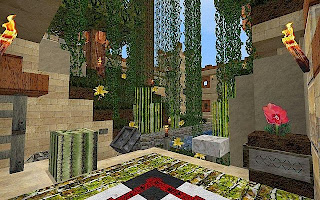
[Texture Packs] Minecraft Sphax PureBDCraft Texture Pack 1.7/1.6.4/1.6.2

[Texture Packs] Minecraft Sphax PureBDCraft Texture Pack 1.6.2/1.5.2/1.4.7 Name:Sphax PureBDCraft Texture Pack
Author(s):
Sphax
For Versions: Minecraft 1.7 / 1.6.4/1.6.2
Resolution: 16x , 32x , 64x , 128x, 256x, 512x
Update: 1.7 and 1.6.4
Last Updated: September 29, 2013
Category : Minecraft Texture Packs

Minecraft Sphax PureBDCraft Texture Pack Description:

This pack is “vector based” and is available in all common resolutions from 16×16 to 512×512. However, the recommended resolution will still be 128×128.
Use the resolution which fit the “performance” of your computer!

Minecraft Sphax PureBDCraft Texture Pack Screenshot and Video


[Texture Packs] Minecraft Sphax PureBDCraft Texture Pack 1.6.2/1.5.2/1.4.7


Minecraft Sphax PureBDCraft Texture Pack How to Install

  • Install texture packs for 32x or higher.
  • To use this package, you need to use MCPatcher or OptiFine.
  • Patch a fresh version of Minecraft game with “HDTextures” and “HDFont” (you should not check “Better grass”:picture)
  • Recommended: Download the last version of ModLoader and install it (by copying files directly into minecraft.jar)
  • (Recommended: Download the last version of CTM (ConnectedTextures) and install it)
  • Optionnally: Download the last versions of the supported Mods and install them
  • Download this pack “Sphax PureBDCraft”
  • Copy the ZIP file of this pack into your “texturepacks” folder of your “.minecraft” folder.
  • Launch Minecraft and select “Sphax PureBDCraft” pack in the “Mods and Textures Packs” section.

DOWNLOAD NOW

Minecraft Sphax PureBDCraft Texture Pack 1.7/1.6.4:

Minecraft Sphax PureBDCraft Texture Pack For 1.6:
16x:
32x:
64x:
128x:
256x:
512x:
Minecraft Sphax PureBDCraft Texture Pack For 1.5:
16x:
32x:
64x:
128x:
256x:
512x:
Minecraft Sphax PureBDCraft Texture Pack For 1.4:
16x:
32x:
64x:
128x:
256x:
512x:
Minecraft Sphax PureBDCraft Texture Pack For Mobile
IOS:(No jailbreak required*)
Android:(No root required*)

Thứ Bảy, 23 tháng 11, 2013

MojoKraft Realistic Resource + Texture Pack 1.7.2/1.6.4/1.6.2

MojoKraft Realistic Resource + Texture Pack 1.7.2/1.6.4/1.6.2 Name:MojoKraft Realistic Resource + Texture Pack
Author(s):
MojoKraft
For Versions: Minecraft 1.7.2/ 1.6.4/1.6.2
Resolution: 256x
Genres: Resource Packs,Texture Packs
Updated: November 23, 2013
Category :

Description:

This is a MojoKraft Realistic Resource + Texture Pack. Do you know what is MojoKraft Realistic Resource + Texture Pack?

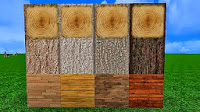
  • REALISTIC and DETAILED pack based on HQ photo textures, interpreting the original minecraft spirit as being a little rustic and with a slight medieval tend and not being too modern.
  • CTM (custom texture mod), custom colors and random mobs (by Dieluther) are heavily used/supported, as well as minecraft 1.7.

Screenshot and Video

MojoKraft Realistic Resource + Texture Pack 1.7.2/1.6.4/1.6.2

MojoKraft Realistic Resource + Texture Pack 1.7.2/1.6.4/1.6.2

MojoKraft Realistic Resource + Texture Pack 1.7.2/1.6.4/1.6.2

MojoKraft Realistic Resource + Texture Pack 1.7.2/1.6.4/1.6.2

MojoKraft Realistic Resource + Texture Pack 1.7.2/1.6.4/1.6.2

How to Install

Texture Packs:
  • Install texture packs for 32x or higher.
  • To use this package, you need to use MCPatcher or OptiFine.
  • Tip: Use OptiFine widely used because it includes all the features and graphics settings. MCPatcher also tend to be updated on the same day as Minecraft. (depending on your fancy). We will install the following:
  • Download MCPatcher or OptiFine.
  • For MCPatcher: Run mcpatcher-xxx.jar file. Then continue to click "patch".
  • For OptiFine: Install OptiFine like any other mod. By the following:
    • 1. Click Start >> Run (Or Windows + R) and Then type the following command and click OK, % appdata% / .minecraft / bin
    • 2. Open minecraft.jar file. and copy files from OptiFine Zip and and placing the .class files from Optifine’s zip file. Save.
Resource Packs:(1.6 or higher)
  • Download Minecraft MojoKraft Realistic Resource + Texture Pack 1.7.2/1.6.4/1.6.2 zip file
  • Click Start > Run (or Windows + R) and Then type in %appdata%
  • Looking .minecraft\resourcepacks folder
  • Open the resourcepack folder which is inside the .minecraft
  • Place this resource packs zip file in the resource pack folder of your minecraft folder
  • Run minecraft and select the pack from the options menu and you are ready to play

DOWNLOAD NOW

MojoKraft Realistic Resource + Texture Pack 1.7.2/1.6.4/1.6.2

Thứ Sáu, 11 tháng 10, 2013

Intermacgod Realistic Modern Resource/Texture Pack 1.6.4/1.6.2

Intermacgod Realistic Modern Resource/Texture Pack 1.6.4/1.6.2 Name:Intermacgod Realistic Modern Resource
Author(s):
Inter_Hell2000
For Versions: Minecraft 1.6.4/1.6.2
Resolution: 256x, 512x
Genres: Resource Packs,Texture Packs
Updated: October 12, 2013
Category :

Intermacgod Realistic Modern Resource Description:

  • This is a Intermacgod Realistic Modern Resource/Texture Pack. Do you know what is Intermacgod Realistic Modern Resource/Texture Pack?
  • Intermacgod Resource (Texture) Pack is another realistic minecraft texture which was inspired by LB Photo, Sphax PureBDCraft and KoP Photo Realism. Plz leave a comment if you love it.

Intermacgod Realistic Modern Resource Screenshot:

Intermacgod Realistic Modern Resource/Texture Pack 1.6.4/1.6.2

Intermacgod Realistic Modern Resource/Texture Pack 1.6.4/1.6.2

Intermacgod Realistic Modern Resource/Texture Pack 1.6.4/1.6.2

Intermacgod Realistic Modern Resource/Texture Pack 1.6.4/1.6.2

Intermacgod Realistic Modern Resource/Texture Pack 1.6.4/1.6.2

Intermacgod Realistic Modern Resource/Texture Pack 1.6.4/1.6.2

Intermacgod Realistic Modern Resource/Texture Pack 1.6.4/1.6.2

Intermacgod Realistic Modern Resource/Texture Pack 1.6.4/1.6.2

Intermacgod Realistic Modern Resource/Texture Pack 1.6.4/1.6.2


Intermacgod Realistic Modern Resource/Texture Pack 1.6.4/1.6.2

Intermacgod Realistic Modern Resource How to Install

Install with OptiFine & Magic Launcher:
  • 1. Download the official Official launcher
  • 2. Download OptiFine HD Ultra 1.6.4
  • 3. Download MagicLauncher
  • 4. Use the Official launcher to download and start Minecraft 1.6.4
  • 5. Login and Click “play”, when menu screen appears exit game.
  • 6. Place my Inter_Realistic_Modern_Pack.Zip file into c:/users/username/appdata/roaming/.mincraft/Resourcepacks folder.
  • 7. Start MagicLauncher
  • 8. Click “Setup”
  • 9. Select Environment “1.6.4″
  • 10. Click “Advance Tab” and setup more memory (example 512 x 8 = 4096) 4 gig of ram.
  • 11. Click “Add” -> select the OptiFine.jar file from where ever you placed the file, then Click “open”
  • 12. Click “OK”,
  • 13. Login and setup Optifine setting under “options Video settings” and change setting to what you like (Note: must use “MipMap Level” to get full features of my pack)
  • 14. Click “Option Resource Packs” and choose Inter_Realistic_Modern_Pack.Zip (Please Note: You must have a powerful computer and it can take up to 1 minute for this pack to load.)
  • 15. Click “Done” and you are ready to play.

Install with Official Launcher (Grainy Look):
  • 1. Use the official launcher to download and start Minecraft 1.6.4.
  • 2. Click “Edit Profile”
  • 3. Tick Boxes “Executable and JVM Arguments”
  • 4. Change (-Xmx1G) to (-Xmx4G) and Save Profile
  • 5. Login and Click “play”
  • 6. Click “OptionsResource Packs”
  • 7. Click “open resource pack folder”
  • 8. Place my Inter_Realistic_Modern_Pack.Zip into Resourcepacks folder
  • 9. Choose Inter_Realistic_Modern_Pack.Zip (Please Note: You must have a powerful computer and it can take up to 1 minute for this pack to load.)
  • 10. Click “Done” and play.

DOWNLOAD NOW

Intermacgod Realistic Modern Resource/Texture Pack For 1.6:
512x:  Server Mediafire | Server Mega | Server Putlocker
256x:  Server Mediafire | Server Mega | Server Putlocker

Minecraft BlueGamerzTM’s Skyrim Texture Pack 1.5.2

Minecraft BlueGamerzTM’s Skyrim Texture Pack 1.5.2 Name:BlueGamerzTM’s Skyrim Texture Pack
Author(s):
BlueGamerzTM
For Versions: Minecraft 1.5.2
Resolution: 256x
Genres: Texture Packs
Updated: October 11, 2013
Category :

BlueGamerzTM’s Skyrim Texture Pack Description:

This is a BlueGamerzTM’s Skyrim Texture Pack. Do you know what is BlueGamerzTM’s Skyrim Texture Pack?

BlueGamerzTM’s Skyrim Texture Pack Screenshot

Minecraft BlueGamerzTM’s Skyrim Texture Pack 1.5.2

Minecraft BlueGamerzTM’s Skyrim Texture Pack 1.5.2

Minecraft BlueGamerzTM’s Skyrim Texture Pack 1.5.2

Minecraft BlueGamerzTM’s Skyrim Texture Pack 1.5.2

Minecraft BlueGamerzTM’s Skyrim Texture Pack 1.5.2

Minecraft BlueGamerzTM’s Skyrim Texture Pack 1.5.2

Minecraft BlueGamerzTM’s Skyrim Texture Pack 1.5.2

Minecraft BlueGamerzTM’s Skyrim Texture Pack 1.5.2

Minecraft BlueGamerzTM’s Skyrim Texture Pack 1.5.2

BlueGamerzTM’s Skyrim Texture Pack How to Install

  • Install texture packs for 32x or higher.
  • To use this package, you need to use MCPatcher or OptiFine.
  • Tip: Use OptiFine widely used because it includes all the features and graphics settings. MCPatcher also tend to be updated on the same day as Minecraft. (depending on your fancy). We will install the following:
  • Download MCPatcher or OptiFine.
  • For MCPatcher: Run mcpatcher-xxx.jar file. Then continue to click "patch".
  • For OptiFine: Install OptiFine like any other mod. By the following:
    • 1. Click Start >> Run (Or Windows + R) and Then type the following command and click OK, % appdata% / .minecraft / bin
    • 2. Open minecraft.jar file. and copy files from OptiFine Zip and and placing the .class files from Optifine’s zip file. Save.

DOWNLOAD NOW

BlueGamerzTM’s Skyrim Texture Pack

Thứ Tư, 2 tháng 10, 2013

[Texture Packs] Minecraft R3D.CRAFT Texture Pack 1.6.4/1.6.2

[Texture Packs] Minecraft R3D.CRAFT Texture Pack 1.6.4/1.6.2 Name: R3D.CRAFT Texture Pack
Author(s):
UniblueMedia
For Versions: Minecraft 1.6.4 / 1.6.2
Resolution:  32x , 64x , 128x, 256x, 512x
Genres:
Updated: October 02, 2013
Category : Texture Packs , Resource Packs

[Texture Packs] Minecraft R3D.CRAFT Texture Pack 1.6.4/1.6.2.Description:

This is a  R3D.CRAFT Texture Pack. Do you know what is  R3D.CRAFT Texture Pack?
  • R3D.CRAFT, pronounced “Red Craft” or “R-3-D Craft”, may be a prime quality texture pack that may be applied to the sport, Minecraft. supported the default texture that belongs to the present game, R3D.CRAFT tries to bring a lot of realization, with prime quality textures, sander gradients and shadows, artificial lighting, tiny details or new details + such a lot a lot of.
  • This texture is created for people who ask for a lot of quality in-game, however additionally wish to stay the default style and feeling. Therefore, this texture tries to remain near the first outlook, by matching the right colours and shapes.One of the best textures that exist. I have not ever seen or tested such an amazing texture pack. It is realy awesome! R3D.CRAFT is made on the basis of the default texture pack. If you like the standard style of play and you want to preserve that atmosphere, but at the same time improve the quality of hraphics in minecraft then this textures are made for you

Screenshot and Video


[Texture Packs] Minecraft R3D.CRAFT Texture Pack 1.6.4/1.6.2

How to Install

  • Install texture packs for 32x or higher.
  • To use this package, you need to use MCPatcher or OptiFine.
  • Tip: Use OptiFine widely used because it includes all the features and graphics settings. MCPatcher also tend to be updated on the same day as Minecraft. (depending on your fancy). We will install the following:
  • Download MCPatcher or OptiFine.
  • For MCPatcher: Run mcpatcher-xxx.jar file. Then continue to click "patch".
  • For OptiFine: Install OptiFine like any other mod. By the following:
    • 1. Click Start >> Run (Or Windows + R) and Then type the following command and click OK, % appdata% / .minecraft / bin
    • 2. Open minecraft.jar file. and copy files from OptiFine Zip and and placing the .class files from Optifine’s zip file. Save.

DOWNLOAD NOW

R3D.CRAFT Resource Pack 1.6.4 only
For 32x32 Texture Packs:
For 64x64 Texture Packs:
For 128x128 Texture Packs:
For 256x256 Texture Packs:
For 512x512 Texture Packs:

Chủ Nhật, 22 tháng 9, 2013

[Texture Packs] Minecraft Maraxos Realism HD Texture Pack 1.5.2

Name:Maraxos Realism HD Texture Pack
Author(s):
Maraxos
For Versions: Minecraft 1.5.2
Resolution: 64x , 128x, 256x
Requires: None
Updated: September 22, 2013
Category : Minecraft Texture Packs

Description:

This is a Maraxos Realism HD Texture Pack. Do you know what is Maraxos Realism HD Texture Pack?

Screenshot:

Posted Image Posted Image Posted Image Posted Image Posted Image Posted Image Posted Image Posted Image Posted Image Posted Image Posted Image Posted Image Posted Image Posted Image Posted Image Posted Image Posted Image Posted Image Posted Image Posted Image Posted Image Posted Image Posted Image Posted Image

How to Install

  • Install texture packs for 32x or higher.
  • To use this package, you need to use MCPatcher or OptiFine.
  • Tip: Use OptiFine widely used because it includes all the features and graphics settings. MCPatcher also tend to be updated on the same day as Minecraft. (depending on your fancy). We will install the following:
  • Download MCPatcher or OptiFine.
  • For MCPatcher: Run mcpatcher-xxx.jar file. Then continue to click "patch".
  • For OptiFine: Install OptiFine like any other mod. By the following:
    • 1. Click Start >> Run (Or Windows + R) and Then type the following command and click OK, % appdata% / .minecraft / bin
    • 2. Open minecraft.jar file. and copy files from OptiFine Zip and and placing the .class files from Optifine’s zip file. Save.

DOWNLOAD NOW

For 64x64 Texture Packs:
For 128x128 Texture Packs:
For 256x256 Texture Packs: